Developer Guide
#Table of Contents
- Acknowledgements / Setting up, getting started
- Introduction
- Design
- Implementation Details
- Documentation, logging, testing, configuration, dev-ops
- Appendix: Requirements
- Appendix: Instructions for manual testing
Acknowledgements
This application is based on addressbook-level3 by se-edu.
Setting up, getting started
Refer to the guide Setting up and getting started.
Introduction
NUSEatWhere is a Command Line (CLI) application which helps you search for the available food options in NUS and make an informed decision on where to eat. It does this via a preloaded set of data paired with commands that helps the user navigate the list of eateries in the National University of Singapore (NUS).
This Developer Guide aims to outline how the NUSEatWhere application was implemented to ensure ease of modifications for any future changes/developments you might have in mind for our application.
For details on commands or how a user would use the application, you can refer to our User Guide.
Design
 Tip: The
 .puml files used to create diagrams in this document can be found in the
diagrams folder. Refer to the
PlantUML Tutorial at se-edu/guides to learn how to create
and edit diagrams.
Architecture
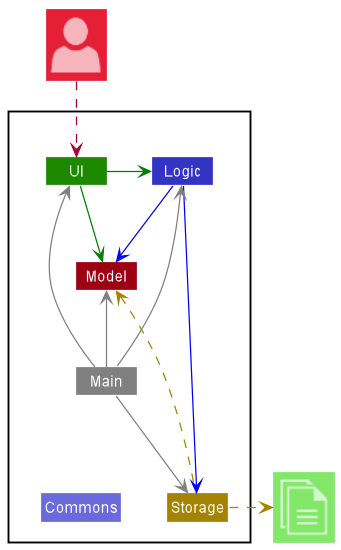
The Architecture Diagram explains the high-level design of the App.
Given below is a quick overview of main components and how they interact with each other.
Main components of the architecture
Main has two classes called
Main and
MainApp.
It is responsible for,
-
At app launch: Initializes the components in the correct sequence, and connects them up with each other.
-
At shut down: Shuts down the components and invokes cleanup methods where necessary.
Commons represents a collection of classes used by multiple other components.
The rest of the App consists of four components.
-
UI: The UI of the App. -
Logic: The command executor. -
Model: Holds the data of the App in memory. -
Storage: Reads data from, and writes data to, the hard disk.
How the architecture components interact with each other
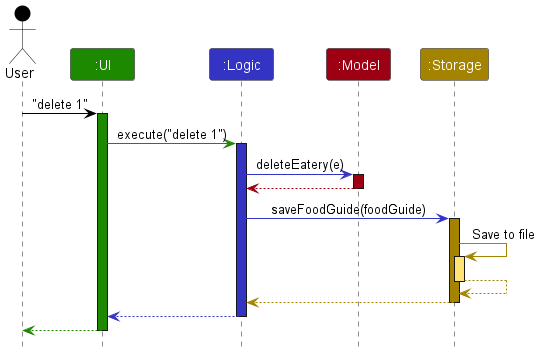
The Sequence Diagram shows how the components interact with each other for the
scenario where the user issues the command `delete 1`.
Each of the four main components (also shown in the diagram above),
- defines its API in an
interfacewith the same name as the Component. - implements its functionality using a concrete
{Component Name}Managerclass (which follows the corresponding APIinterfacementioned in the previous point.
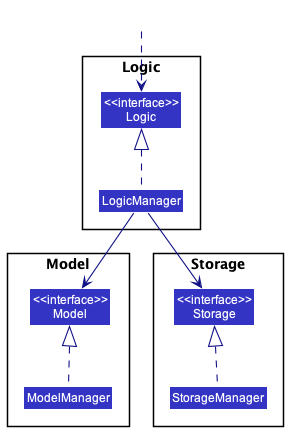
The (partial) class diagram shows how the Logic class interacts with the Model and Storage classes.
For example, the Logic component defines its API in the Logic.java interface and implements its functionality
using the LogicManager.java class which follows the Logic interface. Other components interact with a given
component through its interface rather than the concrete class (reason: to prevent outside component’s being
coupled to the implementation of a component), as illustrated in the (partial) class diagram above.
The sections below give more details of each component.
UI component
The API of this component is specified in
Ui.java
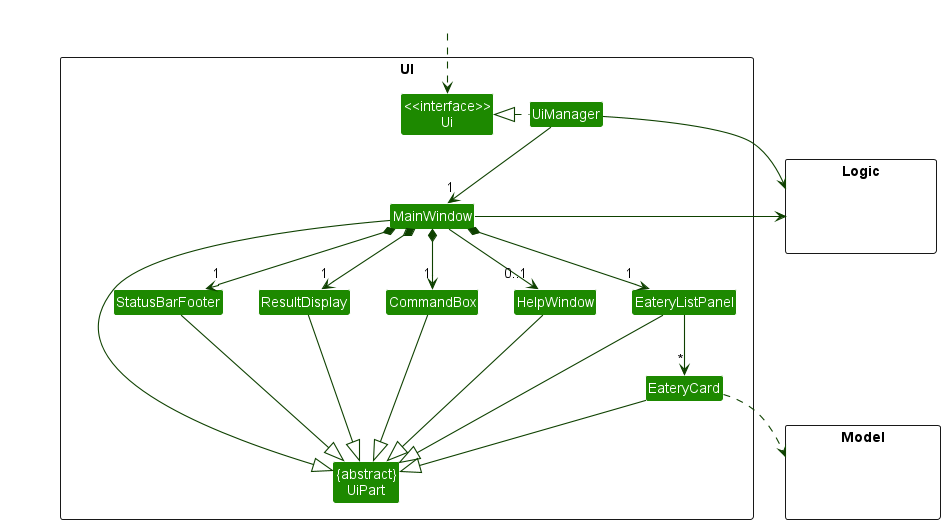
The class diagram showing the Ui class.
The UI consists of a MainWindow that is made up of parts e.g.CommandBox, ResultDisplay, EateryListPanel,
StatusBarFooter etc. All these, including the MainWindow, inherit from the abstract UiPart class which captures
the commonalities between classes that represent parts of the visible GUI.
The UI component uses the JavaFx UI framework. The layout of these UI parts are defined in matching .fxml files
that are in the src/main/resources/view folder. For example, the layout of the
MainWindow
is specified in MainWindow.fxml
The UI component,
-
executes user commands using the
Logiccomponent. -
listens for changes to
Modeldata so that the UI can be updated with the modified data. -
keeps a reference to the
Logiccomponent, because theUIrelies on theLogicto execute commands. - depends on some classes in the
Modelcomponent, as it displays theEateryobject residing in theModel.
Logic component
API : Logic.java
Here’s a (partial) class diagram of the Logic component:
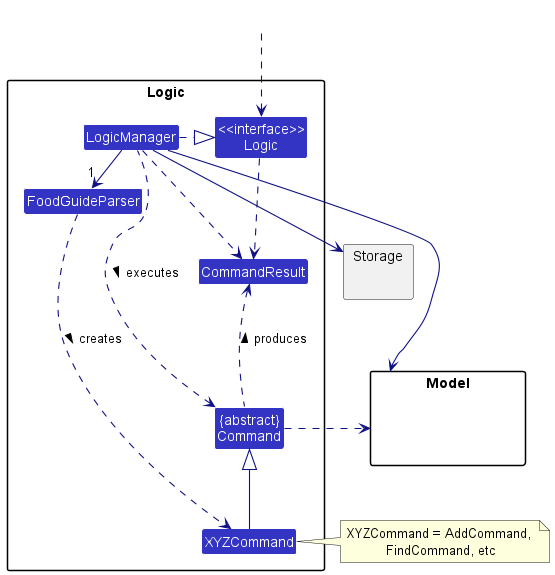
The class diagram showing the Logic class.
How the Logic component works:
- When
Logicis called upon to execute a command, it uses theFoodGuideParserclass to parse the user command. - This results in a
Commandobject (more precisely, an object of one of its subclasses e.g.,AddCommand) which is executed by theLogicManager. - The command can communicate with the
Modelwhen it is executed (e.g. to add an eatery). - The result of the command execution is encapsulated as a
CommandResultobject which is returned back fromLogic.
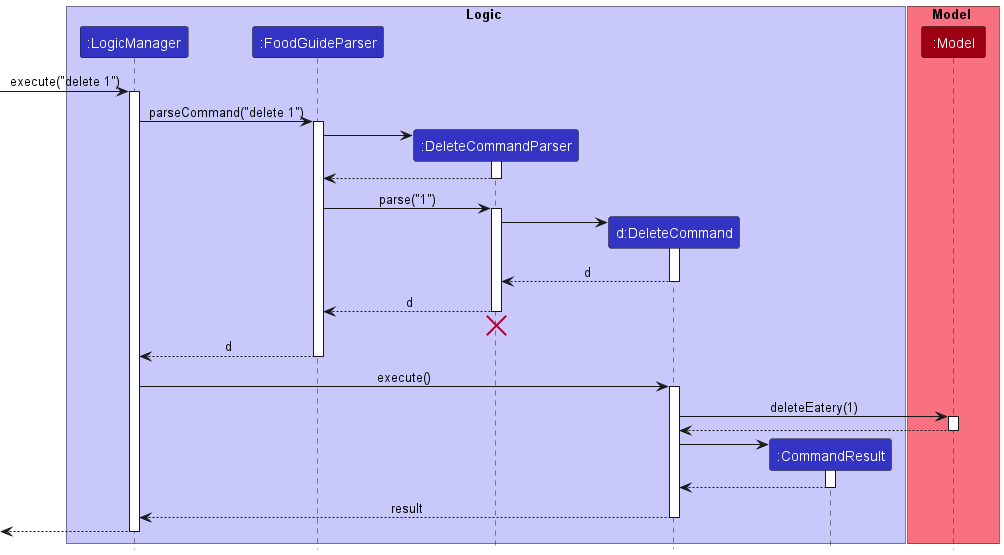
The Sequence Diagram illustrates the interactions within the `Logic` component for the `execute("delete 1")` API call.
 Note: The lifeline for
 DeleteCommandParser should end at the destroy marker (X) but due to a limitation of PlantUML, the lifeline reaches the end of diagram.
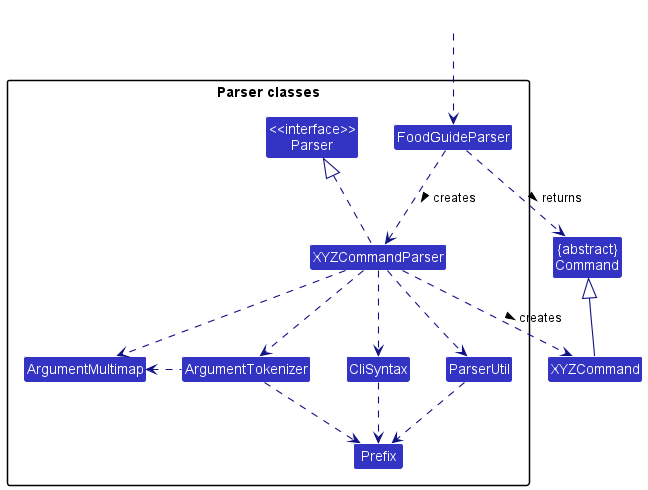
The diagram shows the other classes in `Logic` (omitted from the class diagram above) that are used for parsing a user command.
How the parsing works:
- When called upon to parse a user command, the
FoodGuideParserclass creates anXYZCommandParser(XYZis a placeholder for the specific command name e.g.,AddCommandParser) which uses the other classes shown above to parse the user command and create aXYZCommandobject (e.g.,AddCommand) which theFoodGuideParserreturns back as aCommandobject. - All
XYZCommandParserclasses (e.g.,AddCommandParser,DeleteCommandParser, …) inherit from theParserinterface so that they can be treated similarly where possible e.g, during testing.
Model component
API : Model.java
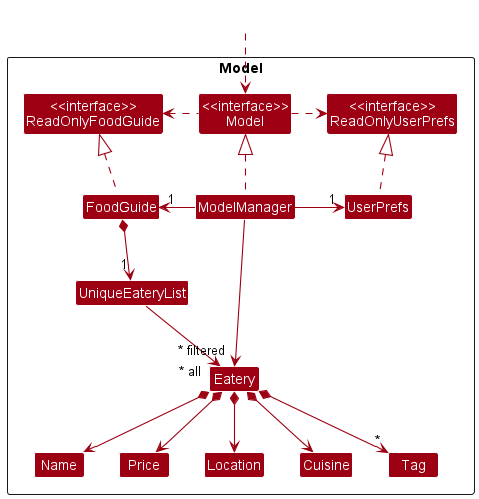
The class diagram shows the Model class.
The Model component,
-
Stores the address book data i.e., all
Eateryobjects (which are contained in aUniqueEateryListobject). -
Stores the currently ‘selected’
Eateryobjects (e.g., results of a search query) as a separate filtered list which is exposed to outsiders as an unmodifiableObservableList<Eatery>that can be ‘observed’ e.g. the UI can be bound to this list so that the UI automatically updates when the data in the list change. -
Stores a
UserPrefobject that represents the user’s preferences. This is exposed to the outside as aReadOnlyUserPrefobjects. - Does not depend on any of the other three components (as the
Modelrepresents data entities of the domain, they should make sense on their own without depending on other components)
Note: An alternative (arguably, a more OOP) model is given below. It has a Tag list in the FoodGuide, which Eatery references. This allows FoodGuide to only require one Tag object per unique tag, instead of each Eatery needing their own Tag objects.<p align="center">
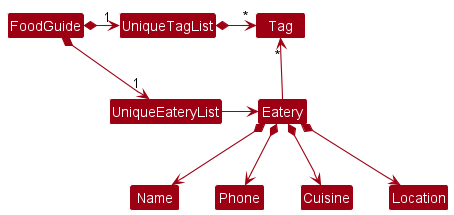
The diagram shows a more OOP model, the main difference being how Tag is implemented. </p>
Storage component
API : Storage.java
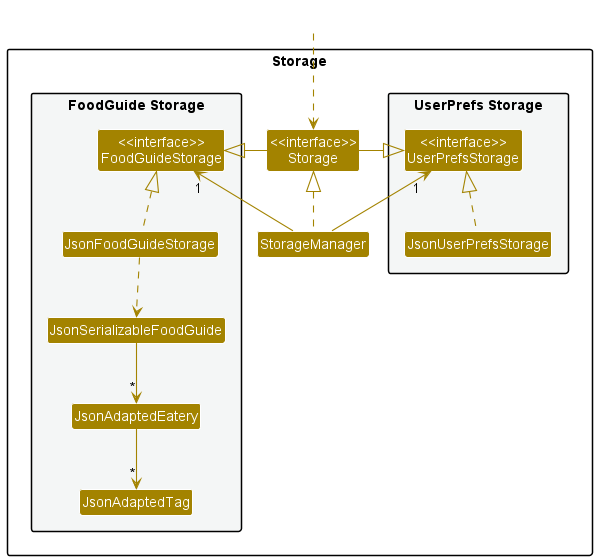
The class diagram shows the Storage class.
The Storage component,
- Can save both food guide data and user preference data in json format, and read them back into corresponding objects.
- Inherits from both
FoodGuideStorageandUserPrefStorage, which means it can be treated as either one (if only the functionality of only one is needed). - Depends on some classes in the
Modelcomponent (because theStoragecomponent’s job is to save/retrieve objects that belong to theModel)
Common classes
Classes used by multiple components are in the eatwhere.foodguide.commons package.
Implementation Details
This section describes some noteworthy details on how certain features are implemented.
Displaying Command Help
Users are able to view a help or usage message for individual commands by including a special flag in their input.
This mimics the behaviour found in other CLI applications and shells, where it is facilitated by
the addition of arguments such as -h, -help, or --help.
Implementation
The FoodGuide’s current PREFIX_HELP, representing the help flag, is -h,
which aligns with the other prefixes in the command syntax.
In the FoodGuide, since all parsing beyond identifying the command word is handled by individual command parsers,
searching for this flag has to be done in these parsers.
Individual CommandParsers return instances of their Command.
Because different commands have varying number of arguments, modifying CommandResult to support the
displaying of a help message would require additional constructors for all supported commands,
which is tedious and makes future commands harder to implement.
Therefore, the option to display help instead makes use of a special exception DisplayCommandHelpException,
which is thrown when PREFIX_HELP is detected. This then bypasses usual command evaluation and
returns the usage message of the command.
The detection of PREFIX_HELP is as follows:
- The prefix must not be accompanied by a value.
-helloand-h ellowill not invoke the exception. - Presence of the prefix overrides other arguments.
The detection rules limit false-positives from stray -hs in names of eateries, locations, etc.
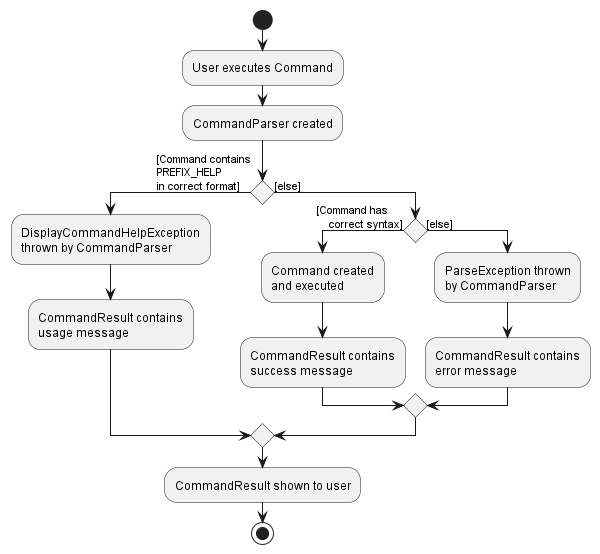
For supported commands, the activity diagram summarizes what happens when a user executes a command.
Favourite/Unfavourite feature
The favourite/unfavourite commands were introduced as a way to standardize how “favourite eateries” are tagged.
In a way, fav/unfav is a shortcut for tag/untag. The “<3” favourite tag is implemented in such a way in the interest of time, and the fact that
it can be searched up with other tags via findTag, hence proving to be more useful at the project’s current iteration.
Implementation
Currently, FavouriteCommand/UnfavouriteCommand is similar to the other commands available for use, with the exception that it
extends TagCommand/UntagCommand and not Command. Since FavouriteCommand and UnfavouriteCommand are both implemented
in a similar way, this section will be focusing mainly on FavouriteCommand for ease of explanation.
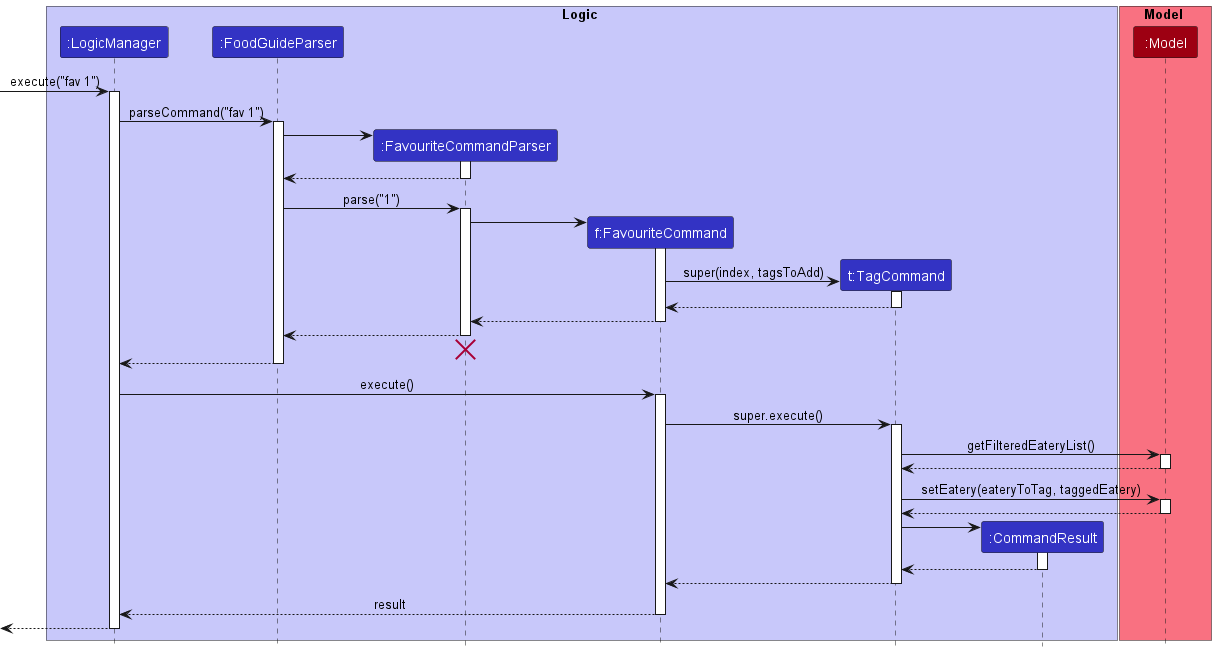
The Sequence Diagram shows the interactions within the Logic component when `fav` is called.
As can be seen by the above diagram, most function calls to FavouriteCommand is directed to TagCommand, though there are some points to note:
- The fixed “
<3” tag should be made into a tag in theFavouriteCommandclass rather than in theTagCommandclass. This is becauseFavouriteCommandis the subclass, henceTagCommandshould have no dependencies onFavouriteCommand. - Using the above-mentioned
-hhelp command should show a custom message forFavouriteCommand, since it’s commandfavis different fromtag. - Upon successfully favouriting an eatery, the user should receive a message indicating the “
<3” is a tag, and can be searched up and used as a criteria for the-rrandomizer feature via thefindTagcommand.
Through a comparison with the sequence diagram found in the logic component section that bears the shape of most of the default commands, it can be seen in exactly which function calls FavouriteCommand differs.
When FavouriteCommand is first initialized, it initializes TagCommand via a super() method call. Hence, the process of turning “<3” into a tag acceptable by TagCommand has to be streamlined, such that prefixes in FavouriteCommand are used.
Additionally, the execute() call to FavouriteCommand is passed onto TagCommand whereby TagCommand then normally interacts with the Model class as other commands do.
This unique implementation of FavouriteCommand and UnfavouriteCommand is especially important to keep in mind if future modifications (e.g. keeping favourited eateries at the top of the list) are implemented.
Optional fields in Eateries (currently not in use)
The ability to keep some fields optional is very useful as the user is less inclined to use a dummy input when seeking to decide on the contents on fields later.
Hence, this works with the edit command to give the user even more flexibility.
Due to the importance of the price field, this option is removed and no longer presented to the user in the current iteration of our product. However, it is still feasible to implement should the need for it arise.
Implementation
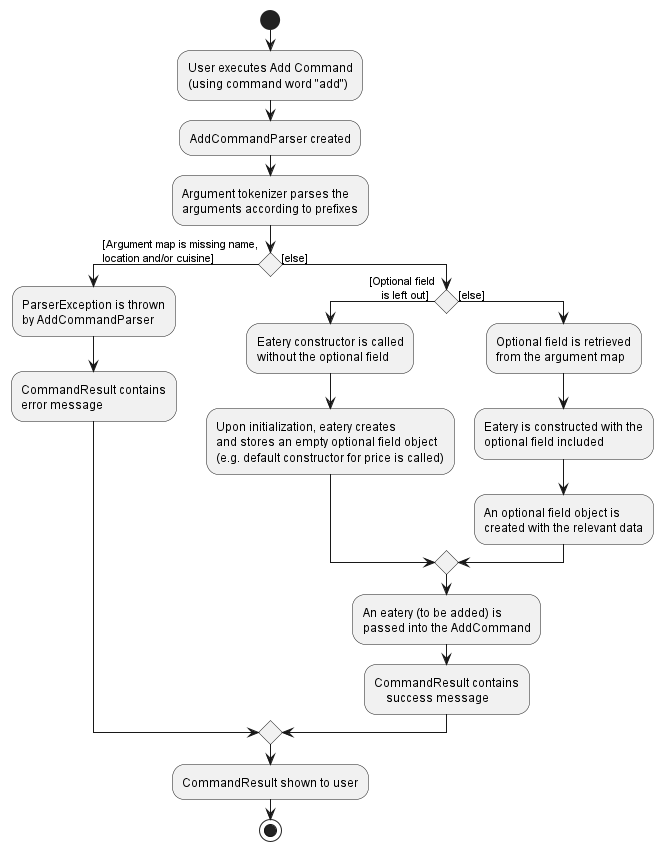
The Activity Diagram shows how different the AddCommandParser and Eatery classes operate with different inputs.
(Note: This diagram omits references to -h help as it is presented on its own. For more information about help, you can refer to the
section about the -h command above.)
As seen from the diagram, the compulsory fields are always checked first to ensure that the argument map does not contain null values.
Thereafter, the call to the optional field’s constructor is handled within the Eatery object.
The optional field should be able to receive both null and non-null values (or by using 2 different constructors), with the input left empty indicating that there is currently no value for the optional field.
At the end, a complete eatery is returned to be added, with other classes having no idea whether the Eatery contains the optional field or not.
Since null values may cause NullPointerException errors, it is important that all data relating to this field is kept within the class itself. Hence, heavy abstraction should be used here. Such examples include:
- Not giving public direct access to the value (e.g.
toString()returns" "instead of null) - Keeping the parsing of the data files to the related optional field class only
There are several ways to deal with storing this optional value, but the one that was used for this particular implementation was storing the optional field as an empty "" string. This is because the optional field constructor with a value did not allow null values. Hence, any empty strings appearing in the json save file must have been due to the use of the default constructor.
Searching through Food Guide
Users are currently able to search individual fields of eateries in Food Guide by the following commands:
-
find: search byName -
findLocation: search byLocation -
findCuisine: search byCuisine -
findPrice: search byPrice -
findTags: search byTags
Implementation
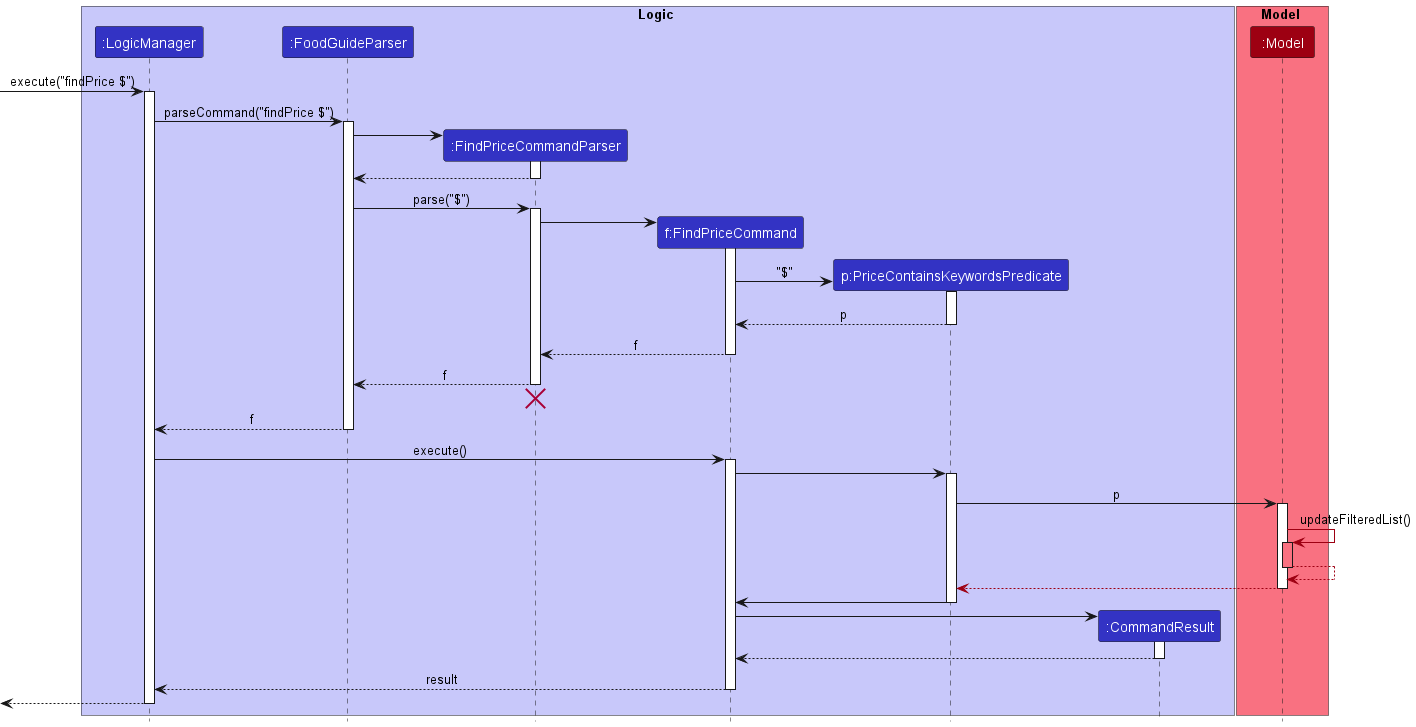
The Sequence diagram *illustrates the interactions within the `Logic` component for the `execute("findPrice $")` API call.*
Augmenting AB3’s current implementation of find, each find command currently has its own CommandParser
which returns its respective Command. To execute the command "findPrice $", FoodGuideParser creates
a FindPriceCommandParser to parse the user command and create a findPriceCommand object.
In order to keep track of the user’s inputted search terms, we utilize XYZContainsKeywordsPredicate
(XYZ is a placeholder for the field being searched, e.g. LocationContainsKeywordsPredicate).
XYZContainsKeywordsPredicate implements the Java functional interface Predicate<Eatery>,
taking in an Eatery object while containing the user’s inputted search terms in the form of a list.
The Predicate returns True if, for the field being searched,
ANY of the search terms in said Predicate’s list matches the value stored in an eatery’s field.
In particular, the current implementation of find and findLocation, we perform a case-insensitive substring search.
For each respective Predicate object, it tests True if any of the user’s inputted search terms
is a substring of the eatery’s stored name or location respectively. For example, given an eatery with the location
"(Frontier, Air-Con)", LocationContainsKeywordsPredicate will test True for any of (but not limited to)
the following search terms:
-
"("and")", -
"-"and",", -
"Front","Frontier,"and"air-con"
Each XYZContainsKeywordsPredicate is then used by ModelManager to update the current list of displayed eateries.
Documentation, logging, testing, configuration, dev-ops
Appendix: Requirements
Product scope
Target user profile: This product is for …
- NUS students/staff who prefer Command Line Interface (CLI) over Graphical User Interface (GUI)
- want to keep track of the various food options in NUS.
Value proposition: This application summarizes the various food options available in NUS, and allows users to make an informed choice as to what to eat.
User stories
Priorities: High (must have) - * * *, Medium (nice to have) - * *, Low (unlikely to have) - *
| Priority | As a … | I want to … | So that I can… |
|---|---|---|---|
* * * |
user | see usage instructions | easily figure out and remember how to use the app |
* * * |
user | see what stalls there are in NUS | know what food is available |
* * * |
user | search for stalls by name | |
* * * |
user | search for stalls by tags | |
* * * |
user | search for stalls by location | |
* * * |
user | search for stalls by cuisine | |
* * * |
user | tag stalls | organize stalls by tags |
* * * |
user | untag a stall | remove a stall from a tag group |
* * |
user | add new eateries | customize the list |
* * |
user | remove eateries | customize the list |
{More to be added}
Use cases
(For all use cases below, the System is the FoodGuide and the Actor is the user, unless specified otherwise)
Use case: Search stall by Cuisine
MSS
- User requests to search for stall by cuisine
- NUSEatWhere returns a list of all the eateries of the given cuisine
Use case: Search stall by Name
MSS
- User requests to search for stall by name
- NUSEatWhere returns a list of all the eateries with a matching name
Use case: Search stall by Tag
MSS
- User requests to search for stall by tag
- NUSEatWhere returns a list of all the eateries with that tag
Use case: Search stall by Location
MSS
- User requests to search for stall by location
- NUSEatWhere returns a list of all the eateries with that location
Use case: Help Command
MSS
- User enters the help command
- NUSEatWhere returns a list of all commands and their functionality explained
Use case: List Command
MSS
- User enters the list command
- NUSEatWhere returns a list of all eateries
Use case: Tag Command
MSS
- User requests to tag an eatery
- NUSEatWhere adds a tag to the eatery and shows the updated eatery.
Use case: Untag Command
MSS
- User requests to untag an eatery
- NUSEatWhere untags the eatery and shows the updated eatery
Use case: Add Command
MSS
- User requests to add an eatery
- NUSEatWhere adds the eatery to the list.
Use case: Delete Command
MSS
- User requests to delete an eatery
- NUSEatWhere deletes the eatery from the list.
Non-Functional Requirements
-
Should work on any mainstream OS as long as it has Java
11or above installed. -
Should be able to hold up to 100 tagged eateries without a noticeable sluggishness in performance for typical usage.
-
Should be able to store and load data for at least tagged 100 eateries
-
A user with above average typing speed for regular English text (i.e. not code, not system admin commands) should be able to accomplish most of the tasks faster using commands than using the mouse.
-
Should be usable for users who have never been to NUS
{More to be added}
Glossary
- Mainstream OS: Windows, Linux, Unix, OS-X
Appendix: Instructions for manual testing
Given below are instructions to test the app manually.
Note: These instructions only provide a starting point for testers to work on;
testers are expected to do more exploratory testing.
Launch and shutdown
-
Initial launch
-
Download the jar file and copy into an empty folder
-
Double-click the jar file Expected: Shows the GUI with a set of sample contacts. The window size may not be optimum.
-
Saving window preferences
-
Resize the window to an optimum size. Move the window to a different location. Close the window.
-
Re-launch the app by double-clicking the jar file.
Expected: The most recent window size and location is retained.
Deleting an Eatery
-
Deleting an eatery while all eatery are being shown
-
Prerequisites: List all eateries using the
listcommand. Multiple eateries in the list. -
Test case:
delete 1
Expected: First eatery is deleted from the list. Details of the deleted eatery shown in the status message. Timestamp in the status bar is updated.
- Test case:
delete 0
Expected: No eatery is deleted. Error details shown in the status message. Status bar remains the same.
- Other incorrect delete commands to try:
delete,delete x,...(where x is larger than the list size)
Expected: Similar to previous.
Saving data
Dealing with missing/corrupted data files
- Delete the
foodguide.jsonfile found indata
Expected: If the data is missing, a default food guide list starts up.
- Edit the keys (e.g.
nametonnnn) in thefoodguide.jsonfile found indata
Expected: If the data is formatted wrongly, a blank food guide list starts up.